
Svelte从入门到精通——变量更新
发表于 阅读时长14分钟
目录
解析表达式
目前,我们在标签内的展示内容,都是静态文本。这一章,我们添加对诸如<div>{count}</div>形式内容的支持。
首先在parseFragment方法中添加parseExpression方法:
function parseFragment() {
  return parseScript() ?? parseElement() ?? parseText() ?? parseExpression();
}
function parseExpression() {
  if (match('{')) {
    eat('{');
    const expression = parseJavaScript();
    eat('}');
    return {
    type: 'Expression',
    expression,
    };
  }
}
在《解析html》章节,我们已经实现了parseJavaScript的支持,其功能就是调用acorn的parseExpressionAt方法。parseExpression返回type: 'Expression'类型的对象。
完善generate内的traverse方法:
function traverse(node, parent) {
  switch(node.type) {
    ...

    case 'Expression': {
      const variableName = `exp_${counter++}`;
      const expressionStr = escodegen.generate(node.expression);
      code.variables.push(variableName);
      code.create.push(
        `${variableName} = text(${expressionStr})`
      );
      code.create.push(`append(${parent}, ${variableName});`);
      break;
    }
  }
}
对于Expression类型的对象,调用escodegen.generate来生成js代码。
修改App.svelte的内容,同时我们把原来的button自定义样式移除。
通过编译后的方法中,我们可以看到:
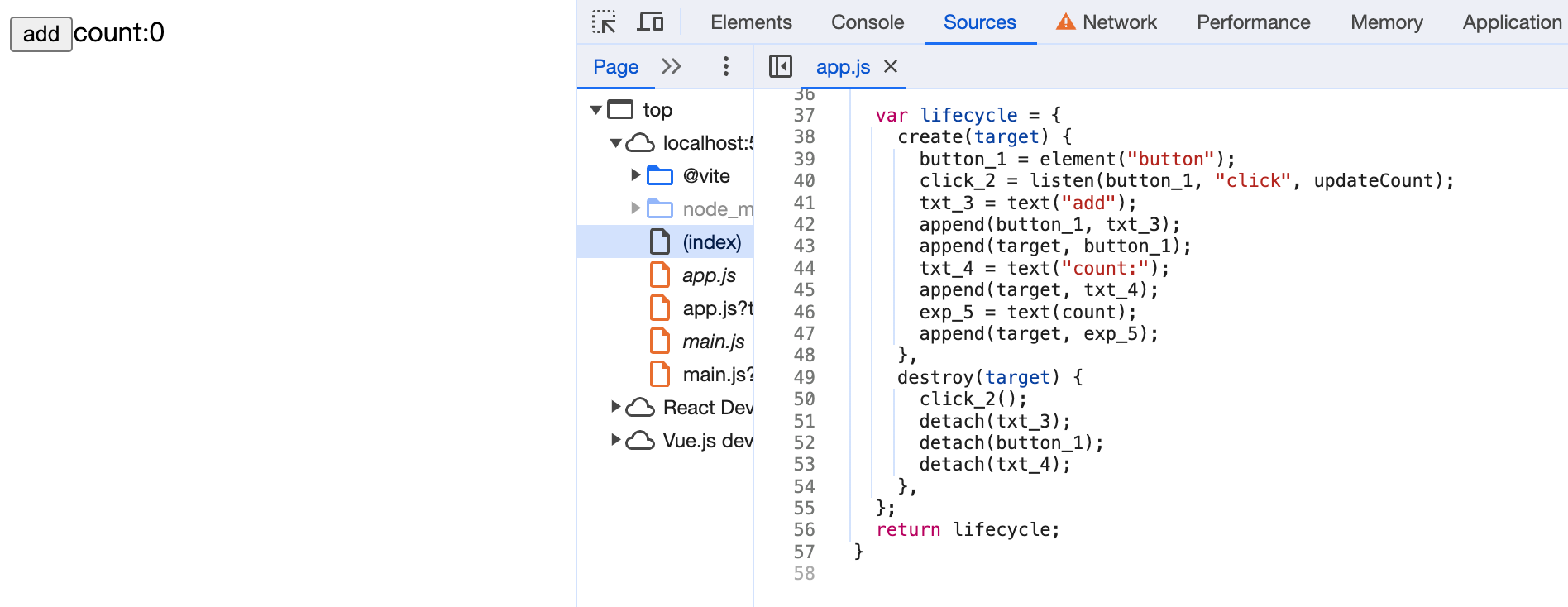
我们的{count}已经能被编译成exp_5 = text(count)。现在我们还差关键的一步:更新状态。
静态分析
我们知道Svelte是在静态代码阶段就解析出变量之间的关系,从而实现了响应式。首先我们定义一个analyse方法,用来解析代码中变量之间的关系,然后在生成阶段,我们会用到这部分数据。
function compile(content) {
  const ast = parse(content); // 解析svelte文件内容成ast
  const analysis = analyse(ast);
  return generate(ast, analysis);
}
function analyse(ast) {
  const result = {
    variables: new Set(),
    willChange: new Set(),
    useInTemplate: new Set(),
  };

  return result;
}
result对象中有三个属性:viriables记录声明的变量,willChange记录会触发更新的变量,useInTemplate记录在html模板内容中使用到的变量。使用Set集合来确保我们记录到的变量唯一不重复。
解析script
安装estree-walker和periscopic。estree-walker用来编译ast对象,periscopic用来分析代码的作用域。
npm install estree-walker periscopic -D
  import * as fs from "fs";
  import { fileURLToPath } from "url";
  import { dirname, resolve } from "path";
  import * as acorn from "acorn";
  import * as escodegen from "escodegen";
  import * as prettier from "prettier";
+ import * as estreewalker from "estree-walker";
+ import * as periscopic from "periscopic";
function analyse(ast) {
  ...
  const { scope: rootScope, map, globals } = periscopic.analyze(ast.script);
  result.variables = new Set(rootScope.declarations.keys());
  result.rootScope = rootScope;
  result.map = map;

  let currentScope = rootScope;
  estreewalker.walk(ast.script, {
    enter(node) {
      if (map.has(node)) {
        currentScope = map.get(node)
      }
      if (node.type === 'UpdateExpression' || node.type === 'AssignmentExpression') {
        const names = periscopic.extract_names(node.type === 'UpdateExpression' ? node.argument : node.left);
        for(const name of names) {
          if (currentScope.find_owner(name) === rootScope || globals.has(name)) {
            result.willChange.add(name);
          }
        }
      }
    },
    leave(node) {
      if (map.has(node)) {
        currentScope = currentScope.parent;
      }
    }
  })
}
- 首先我们用
periscopic来analysescript标签内代码的作用域,rootScope.declarations.keys()能够拿到我们定义在script标签内声明的所有变量。 - 使用
estreewalker来遍历script的抽象语法树。enter方法首先拿到当前节点的作用域。然后如果节点的类型是UpdateExpression或AssignmentExpression,它将提取出所有的变量名,并检查这些名字是否在根作用域(rootScope)或全局变量(globals)中。如果是,将这些名字加入到willChange变量中。 - 离开节点时重置作用域
我们举个简单的例子来演示下:
import * as acorn from 'acorn';
import { extract_names } from 'periscopic';
import { walk } from "estree-walker";

export let a = `let a = 0;
let b = 1;
let add1 = () => {
  a++;
}
let add2 = () => {
  a = b + 1;
}
`;

let ast = acorn.parse(a, { ecmaVersion: 2023 });

walk(ast, {
  enter(node) {
    console.log('ast node', node);
    if (node.type === 'UpdateExpression' || node.type === 'AssignmentExpression') {
      const names = extract_names(node.type === 'UpdateExpression' ? node.argument : node.left);
      console.log('variable names', names)
    }
  },
  leave(node) {}
})
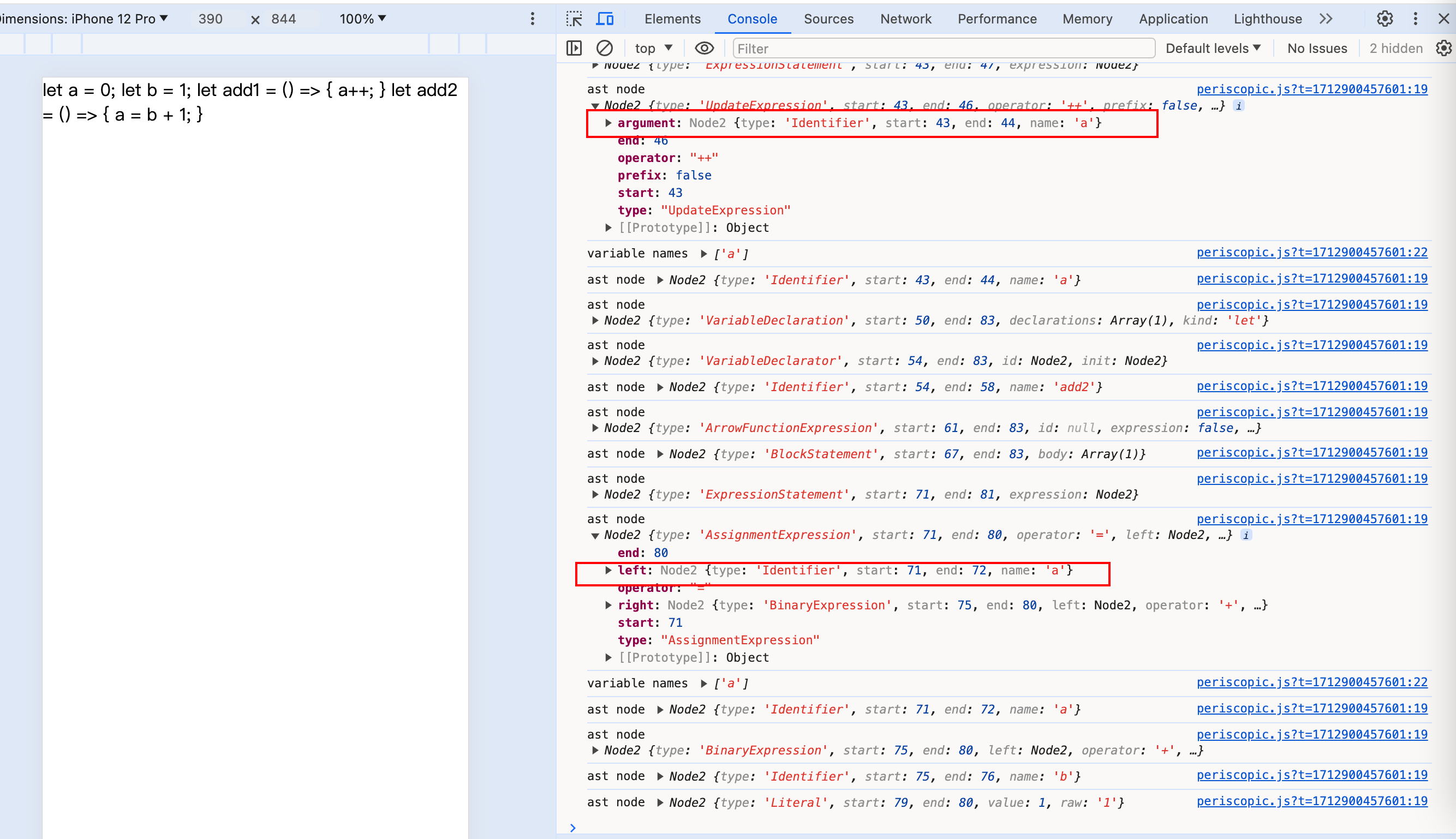
我们可以看到,UpdateExpression对应的是a++相关节点,通过extract_names取node.argument里的name即是自增赋值后要更新的变量a,而AssignmentExpression对应的是a = b + 1;,extract_names需要取node.left里的name,才能取到被赋值后的变量。
解析html
完善analyse方法:
function traverse(fragment) {
  switch(fragment.type) {
    case 'Element':
      fragment.children.forEach((child) => traverse(child));
      break;
    case 'Expression': {
      periscopic.extract_names(fragment.expression).forEach((name) => {
        result.willUseInTemplate.add(name);
      });
      break;
    }
  }
}
ast.html.forEach(fragment => traverse(fragment));
willUseInTemplate用来存储在html模板语法内使用到的变量,比如以下例子:
<div>{count}</div>
{count}中的count会被记录到willUseInTemplate中。
编译
完善generate方法:
function generate(ast, analysis) {

  const code = {
    variables: [],
    create: [],
+   update: [],
    destroy: [],
  };
  ...
}
添加update属性,用来存放更新逻辑的代码。
编译script
在generate方法中添加:
const { rootScope, map } = analysis;
let currentScope = rootScope;
estreewalker.walk(ast.script, {
  enter(node, parent) {
    if (map.has(node)) {
      currentScope = map.get(node)
    }
    if (node.type === 'UpdateExpression' || node.type === 'AssignmentExpression') {
      const names = periscopic
        .extract_names(
          node.type === 'UpdateExpression' ? node.argument : node.left
        )
        .filter(
          (name) =>
            currentScope.find_owner(name) === rootScope &&
            analysis.willUseInTemplate.has(name)
        );
      if (names.length > 0) {
        this.replace({
          type: 'SequenceExpression',
          expressions: [
            node,
            acorn.parseExpressionAt(`$$update(${JSON.stringify(names)})`, 0, {
              ecmaVersion: 2023,
            }),
          ],
        });
        this.skip();
      }
    }
  },
  leave(node) {
    if (map.has(node)) {
      currentScope = currentScope.parent;
    }
  }
});
- 一个比较重要的步骤是使用
periscopic的extract_names方法提取出所有的变量名,然后过滤出在根作用域中并且在模板中会使用的变量名。 - 如果我们筛选出了符合条件的变量名,我们在这个变量名后面添加一个约定字符串
$$update([x]),这个其实是一个方法,我们用它来模拟在运行时的$invalidate。
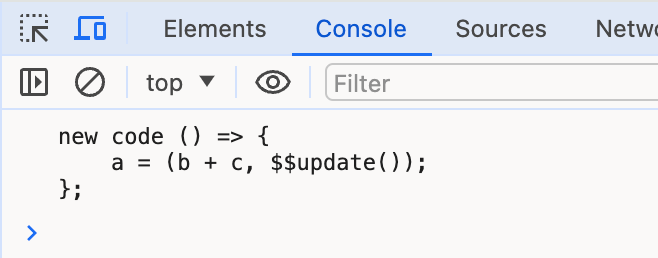
演示一个例子:
import * as acorn from "acorn";
import { walk } from "estree-walker";
import * as escodegen from "escodegen";

export let a = `() => { a = b + c}`;

let ast = acorn.parse(a, { ecmaVersion: 2023 });
walk(ast, {
  enter(node) {
    if (node.type === "BinaryExpression") {
      this.replace({
        type: "SequenceExpression",
        expressions: [
          node,
          acorn.parseExpressionAt(`$$update()`, 0, {
            ecmaVersion: 2023,
          }),
        ],
      });
      this.skip();
    }
  },
});

let newCode = escodegen.generate(ast);
console.log('new code', newCode);
编译html
为Expression添加逻辑:
function generate(ast, analysis) {
  const code = {
    variables: [],
    create: [],
    update: [],
    destroy: [],
  };

  let counter = 1;

  function traverse(node, parent) {
    switch (node.type) {
	  ...

      case "Expression": {
        ...

        // 更新
        const names = periscopic.extract_names(node.expression);
        if (analysis.willChange.has(names[0])) {
          let condition = `changed.includes('${names[0]}')`;
          code.update.push(`if (${condition}) {
            ${variableName}.data = ${expressionStr};
          }`);
        }
        break;
      }
    }
  }

  ast.html.forEach((fragment) => traverse(fragment, "target"));

  ...

}
- 首先我们从expression表达式中的变量中筛选出即将要更新的变量
- 这里我们假设我们的
{}表达式内只存在一个变量。willChange中记录的是被赋值后将要更新的变量,判断{}内获取到的变量名是否存在在willChange集合中,是的话填写我们的编译后的判断条件代码,把这部分执行逻辑放到code.update中,让它在变量更新后执行。
最后,我们需要完善我们默认导出的字符串模板内容
function generate(ast, analysis) {
  return `
    ...

    export default function() {
      ${code.variables.map((v) => `let ${v};`).join("\n")}

      let collectChanges = [];

      function $$update(changed) {
        changed.forEach(c => collectChanges.push(c));
        lifecycle.update(collectChanges);
      }

      ${escodegen.generate(ast.script)}

      var lifecycle = {
        create(target) {
          ${code.create.join("\n")}
        },
        update(changed) {
          ${code.update.join('\n')}
        },
        destroy(target) {
          ${code.destroy.join("\n")}
        }
      };
      return lifecycle;
    }
  `;
}
- 添加
$$update方法,这个方法我们在前面已经通过逻辑判断,只要变量会更新,在后面便会带上该方法。 lifecycle中补充update的逻辑,展开code.update中已经存放好的update生命周期的方法。
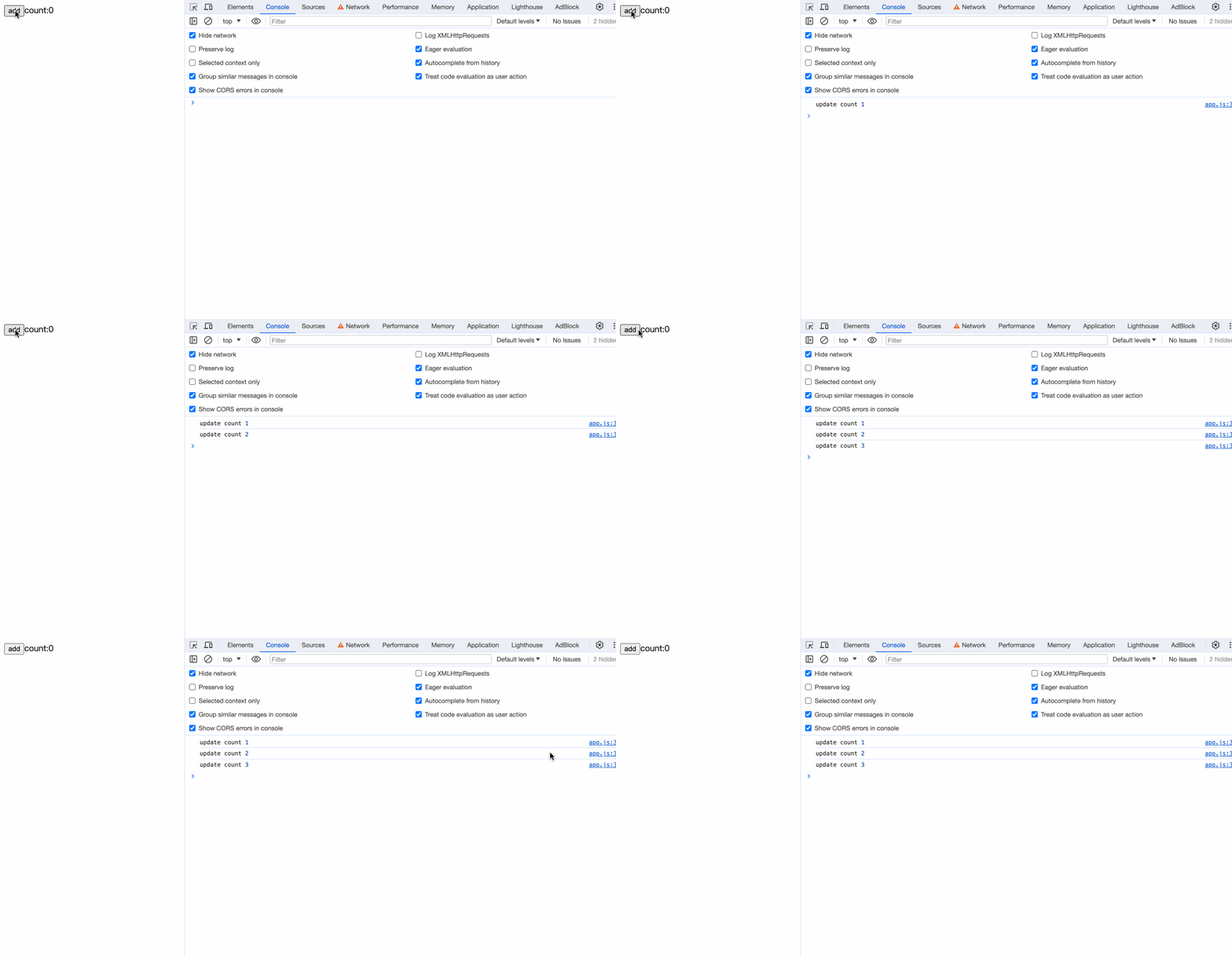
我们修改App.svelte的内容测试一下:
<script>
  let count = 0;
  const updateCount = () => {
    count++;
    console.log('update count', count);
  }
</script>

<button on:click={updateCount}>add</button>
count: {count}
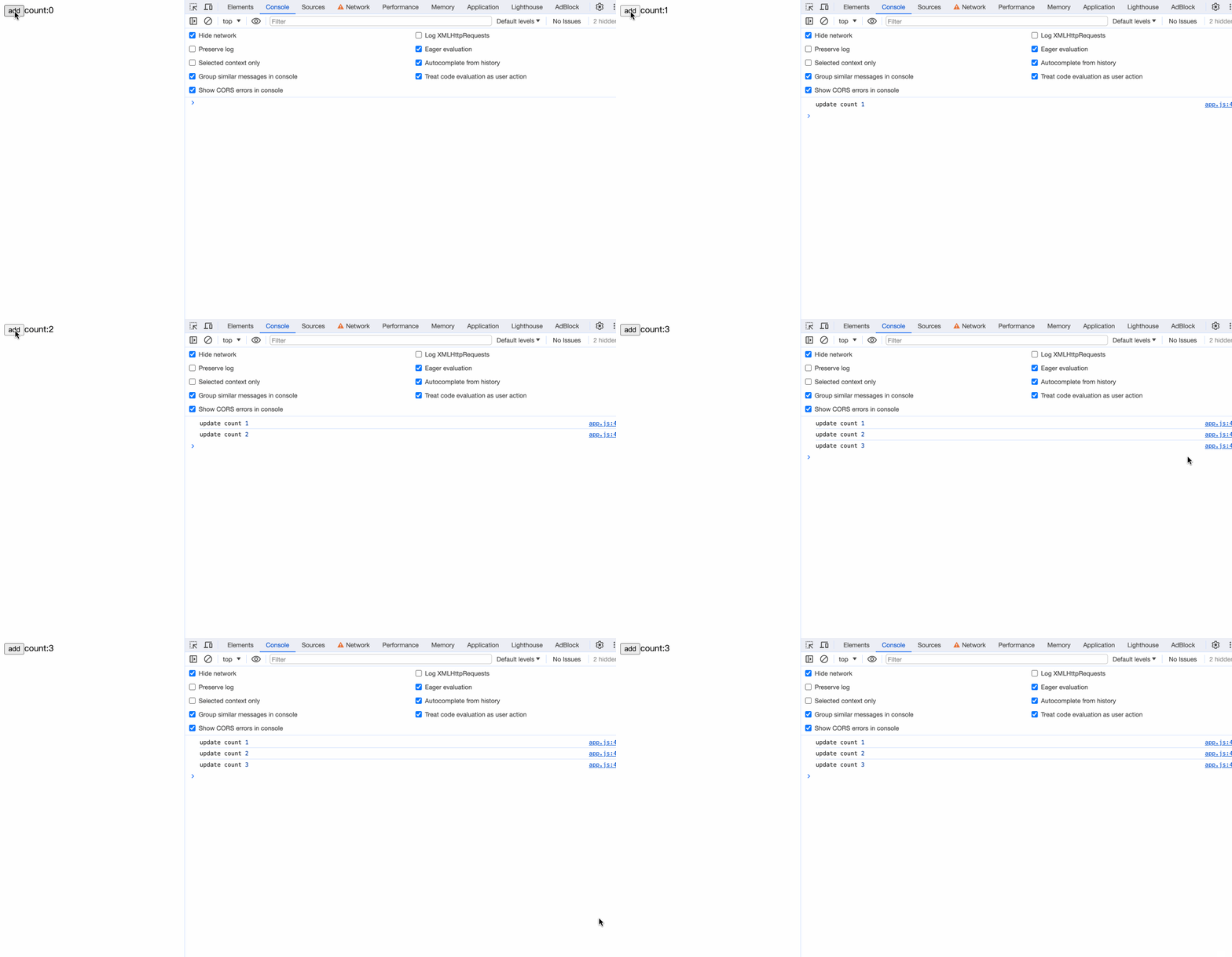
观察编译后的代码,发现在count++后携带了$$update([count]):
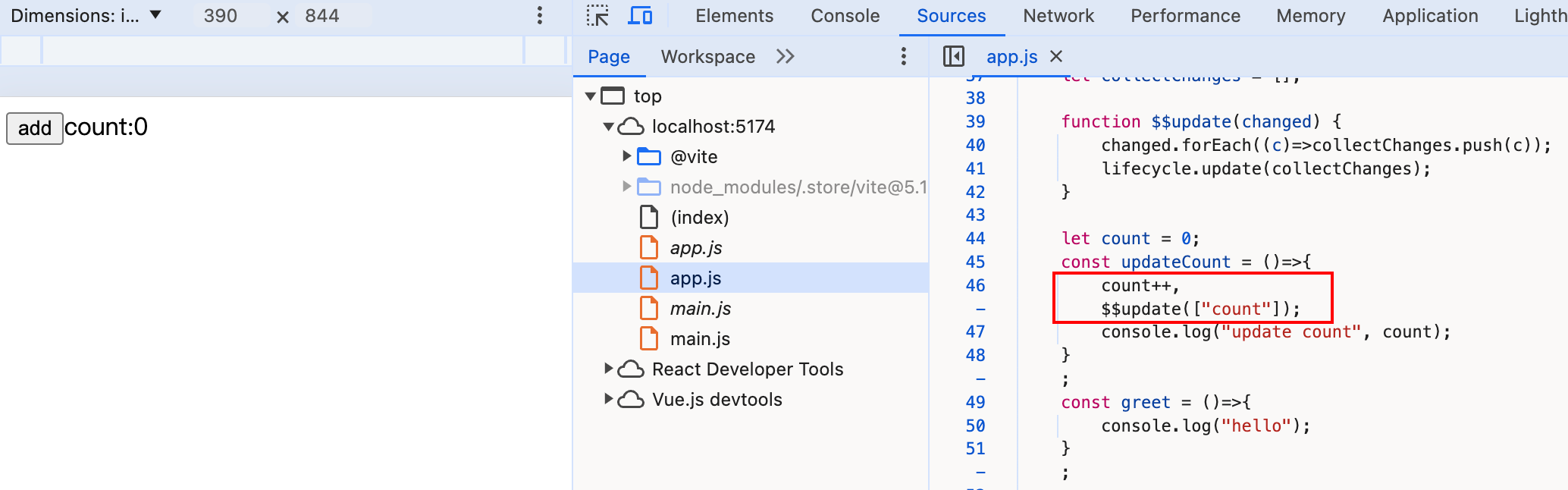
到这里,一个最最基本的Svelte编译器已经完成!
完整代码
import * as fs from "fs";
import { fileURLToPath } from "url";
import { dirname, resolve } from "path";
import * as acorn from "acorn";
import * as escodegen from "escodegen";
import * as prettier from "prettier";
import * as estreewalker from "estree-walker";
import * as periscopic from "periscopic";

const modulePath = dirname(fileURLToPath(import.meta.url));

async function bootstrap() {
  try {
    const inputPath = resolve(modulePath, "./App.svelte");
    const outputPath = resolve(modulePath, "./app.js");
    const content = fs.readFileSync(inputPath, "utf-8");
    const compiledContent = compile(content);
    const prettierContent = await prettier.format(compiledContent, {
      parser: "babel",
    });
    fs.writeFileSync(outputPath, prettierContent, "utf-8");
  } catch (e) {
    console.error(e);
  }
}

function compile(content) {
  const ast = parse(content); // 解析svelte文件内容成ast
  const analysis = analyse(ast);
  return generate(ast, analysis);
}

function parse(content) {
  let i = 0;
  const ast = {};
  ast.html = parseFragments(() => i < content.length);

  return ast;

  function parseFragments(condition) {
    const fragments = [];
    while (condition()) {
      const fragment = parseFragment();
      if (fragment) {
        fragments.push(fragment);
      }
    }
    return fragments;
  }

  function parseFragment() {
    return parseScript() ?? parseElement() ?? parseText() ?? parseExpression();
  }

  function parseScript() {
    skipWhitespace();
    if (match("<script>")) {
      eat("<script>");
      const startIndex = i;
      const endIndex = content.indexOf("</script>", i);
      const code = content.slice(startIndex, endIndex);
      ast.script = acorn.parse(code, { ecmaVersion: 2023 });
      i = endIndex;
      eat("</script>");
      skipWhitespace();
    }
  }

  function parseElement() {
    skipWhitespace();
    if (match("<")) {
      eat("<");
      const tagName = readWhileMatching(/[a-z]/);
      const attributes = parseAttributes();
      eat(">");
      const endTag = `</${tagName}>`;
      const element = {
        type: "Element",
        name: tagName,
        attributes,
        children: parseFragments(() => !match(endTag)),
      };
      eat(endTag);
      skipWhitespace();
      return element;
    }
  }

  function parseAttributes() {
    skipWhitespace();
    const attributes = [];
    while (!match(">")) {
      attributes.push(parseAttribute());
      skipWhitespace();
    }
    return attributes;
  }

  function parseAttribute() {
    const name = readWhileMatching(/[^=]/);
    if (match("={")) {
      eat("={");
      const value = parseJavaScript();
      eat("}");
      return {
        type: "Attribute",
        name,
        value,
      };
    }
  }

  function parseExpression() {
    if (match("{")) {
      eat("{");
      const expression = parseJavaScript();
      eat("}");
      return {
        type: "Expression",
        expression,
      };
    }
  }

  function parseJavaScript() {
    const js = acorn.parseExpressionAt(content, i, { ecmaVersion: 2023 });
    i = js.end;
    return js;
  }

  function parseText() {
    const text = readWhileMatching(/[^<{]/);
    if (text.trim() !== "") {
      return {
        type: "Text",
        value: text.trim(),
      };
    }
  }

  function match(str) {
    return content.slice(i, i + str.length) === str;
  }

  function eat(str) {
    if (match(str)) {
      i += str.length;
    } else {
      throw new Error(`Parse error: expecting "${str}"`);
    }
  }

  function readWhileMatching(reg) {
    let startIndex = i;
    while (i < content.length && reg.test(content[i])) {
      i++;
    }
    return content.slice(startIndex, i);
  }

  function skipWhitespace() {
    readWhileMatching(/[\s\n]/);
  }
}

function analyse(ast) {
  const result = {
    variables: new Set(),
    willChange: new Set(),
    useInTemplate: new Set(),
  };

  const { scope: rootScope, map, globals } = periscopic.analyze(ast.script);
  result.variables = new Set(rootScope.declarations.keys());
  result.rootScope = rootScope;
  result.map = map;

  let currentScope = rootScope;
  estreewalker.walk(ast.script, {
    enter(node) {
      if (map.has(node)) {
        currentScope = map.get(node);
      }
      if (
        node.type === "UpdateExpression" ||
        node.type === "AssignmentExpression"
      ) {
        const names = periscopic.extract_names(
          node.type === "UpdateExpression" ? node.argument : node.left
        );
        for (const name of names) {
          if (
            currentScope.find_owner(name) === rootScope ||
            globals.has(name)
          ) {
            result.willChange.add(name);
          }
        }
      }
    },
    leave(node) {
      if (map.has(node)) {
        currentScope = currentScope.parent;
      }
    },
  });

  function traverse(fragment) {
    switch (fragment.type) {
      case "Element":
        fragment.children.forEach((child) => traverse(child));
        break;
      case "Expression": {
        periscopic.extract_names(fragment.expression).forEach((name) => {
          result.useInTemplate.add(name);
        });
        break;
      }
    }
  }
  ast.html.forEach((fragment) => traverse(fragment));

  return result;
}


function generate(ast, analysis) {
  const code = {
    variables: [],
    create: [],
    update: [],
    destroy: [],
  };

  let counter = 1;

  function traverse(node, parent) {
    switch (node.type) {
      case "Element": {
        const variableName = `${node.name}_${counter++}`;
        code.variables.push(variableName);
        code.create.push(`${variableName} = element('${node.name}')`);
        node.attributes.forEach((attribute) => {
          traverse(attribute, variableName);
        });

        node.children.forEach((child) => {
          traverse(child, variableName);
        });

        code.create.push(`append(${parent}, ${variableName})`);
        code.destroy.push(`detach(${variableName})`);
        break;
      }
      case "Text": {
        const variableName = `txt_${counter++}`;
        code.variables.push(variableName);
        code.create.push(`${variableName} = text('${node.value}');`);
        code.create.push(`append(${parent}, ${variableName})`);
        code.destroy.push(`detach(${variableName})`);
        break;
      }
      case "Attribute": {
        if (node.name.startsWith("on:")) {
          const eventName = node.name.slice(3);
          const eventHandler = node.value.name;
          const eventNameCall = `${eventName}_${counter++}`;
          code.variables.push(eventNameCall);
          code.create.push(
            `${eventNameCall} = listen(${parent}, "${eventName}", ${eventHandler})`
          );
          code.destroy.push(`${eventNameCall}()`);
        }
        break;
      }
      case "Expression": {
        const variableName = `exp_${counter++}`;
        const expressionStr = escodegen.generate(node.expression);
        code.variables.push(variableName);
        code.create.push(`${variableName} = text(${expressionStr})`);
        code.create.push(`append(${parent}, ${variableName});`);

        // 更新
        const names = periscopic.extract_names(node.expression);
        if (analysis.willChange.has(names[0])) {
          let condition = `changed.includes('${names[0]}')`;
          code.update.push(`if (${condition}) {
            ${variableName}.data = ${expressionStr};
          }`);
        }
        break;
      }
    }
  }

  ast.html.forEach((fragment) => traverse(fragment, "target"));

  const { rootScope, map } = analysis;
  let currentScope = rootScope;
  estreewalker.walk(ast.script, {
    enter(node, parent) {
      if (map.has(node)) {
        currentScope = map.get(node)
      }
      if (node.type === 'UpdateExpression' || node.type === 'AssignmentExpression') {
        const names = periscopic
          .extract_names(
            node.type === 'UpdateExpression' ? node.argument : node.left
          )
          .filter(
            (name) =>
              currentScope.find_owner(name) === rootScope &&
              analysis.useInTemplate.has(name)
          );
        if (names.length > 0) {
          this.replace({
            type: 'SequenceExpression',
            expressions: [
              node,
              acorn.parseExpressionAt(`$$update(${JSON.stringify(names)})`, 0, {
                ecmaVersion: 2023,
              }),
            ],
          });
          this.skip();
        }
      }
    },
    leave(node) {
      if (map.has(node)) {
        currentScope = currentScope.parent;
      }
    }
  });

  return `
    function element(name) {
      return document.createElement(name);
    }

    function text(data) {
      return document.createTextNode(data);
    }

    function append(target, node) {
      target.appendChild(node);
    }

    function detach(node) {
      if (node.parentNode) {
        node.parentNode.removeChild(node);
      }
    }

    export function listen(node, event, handler) {
      node.addEventListener(event, handler);
      return () => node.removeEventListener(event, handler);
    }

    export default function() {
      ${code.variables.map((v) => `let ${v};`).join("\n")}

      let collectChanges = [];

      function $$update(changed) {
        changed.forEach(c => collectChanges.push(c));
        lifecycle.update(collectChanges);
      }

      ${escodegen.generate(ast.script)}

      var lifecycle = {
        create(target) {
          ${code.create.join("\n")}
        },
        update(changed) {
          ${code.update.join('\n')}
        },
        destroy(target) {
          ${code.destroy.join("\n")}
        }
      };
      return lifecycle;
    }
  `;
}

bootstrap();
小结
本章我们实现了:
- 解析html模板内的变量
- 收集文件中存在更新操作的变量
- 对
<script></script>标签内的更新方法进行重新编译,编译成能够触发框架更新的$$update方法